Play 3D Pinball Space Cadet in your browser
The Space Cadet pinball table that shipped with Windows XP, the original program: flippers, plunger, nudges, sound and high scores, tap-to-flip on phones. 3D Pinball Space Cadet runs in Berrry Wine, a Windows 98 emulator written in WebAssembly Text, so it starts in the browser with nothing to install.
Launch 3D Pinball Space Cadet →
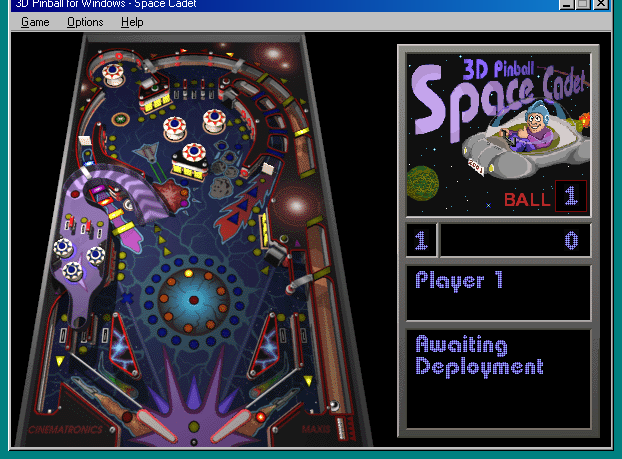
Does 3D Pinball for Windows - Space Cadet run in the browser?
● Plays. 3D Pinball for Windows - Space Cadet (Cinematronics / Maxis, 1995), measured edition by edition:
| Edition | Status | Tested | What works | Not yet |
|---|---|---|---|---|
| Came with Windows | ● Plays | 2026-10-10 | The table loads, the plunger launches the ball, both flippers respond, and the score goes up. |
- Came with Windows (Windows XP and Microsoft Plus! 95 copies)
- Installs: — Sound: — Saves: — Multiplayer: — Touch: — Phone FPS: —
“—” means not tested yet: a fact is filled in only from a recorded test run, never guessed.
Where to get 3D Pinball for Windows - Space Cadet
- It came with Windows.
About this program
| Detail | |
|---|---|
| Executable | pinball.exe |
| Format | 32-bit Windows (PE) |
| Libraries loaded beside it | none; everything else is the emulator's own Win32 layer |
| Data files mounted | 66 |
| Phones | on-screen controls in single-app mode |
| Desktop group | Games and players |
How it runs here
The x86 code is interpreted by threaded code written in WebAssembly Text; windows, controls, menus and dialogs are the emulator's own Win32 layer, and every pixel is drawn by a software GDI in the same module. See how the program and its DLLs are loaded.
Reverse-engineering notes for this program:
Something wrong? The emulator is open source; report it on GitHub with the app name and what you clicked.
Questions
How do I play 3D Pinball Space Cadet in my browser?
Open the 3D Pinball Space Cadet page and click Launch. The program's files are fetched from this site and run inside the tab as WebAssembly; nothing is installed and nothing is uploaded.
What are the controls for 3D Pinball Space Cadet?
Z is the left flipper, / is the right flipper, Space pulls the plunger, X and . nudge the table, and F2 starts a new game. On a phone the left half of the table flips left, the right half flips right, and the strip over the plunger lane launches the ball.
Does 3D Pinball Space Cadet work on a phone?
Yes. On a phone the desktop scales to the screen and 3D Pinball Space Cadet gets on-screen controls for the keys it needs, plus a keyboard button for anything else.
Are my scores and settings saved?
Whatever 3D Pinball Space Cadet writes to the Windows registry or to its INI file is kept in this browser's local storage, so it is there next time on the same device and browser. Clearing site data removes it.
Does 3D Pinball Space Cadet have sound here?
Yes. Sound the program plays through the Windows wave and DirectSound APIs is routed to the browser's Web Audio. Browsers only allow audio after a click or a key press, so it starts with your first input.
Is this the real 3D Pinball Space Cadet or a remake?
It is the original 32-bit Windows (PE) executable (pinball.exe), run instruction by instruction by an x86 interpreter written in WebAssembly Text. The emulator provides the Windows API underneath it, not a rewrite of the program.
Also under "Games and players"
SkiFree · DX-Ball · Blobby Volley · Winamp · StarCraft Demo · Diablo Shareware · Heroes II Demo · RollerCoaster Tycoon · Quake II Demo · Quake III Arena Demo · Half-Life: Uplink Demo · Need for Speed II SE Demo · Need for Speed III Demo · SimCity 2000 Demo · Moorhuhn · Hexen II Demo · Age of Empires Trial